Getting Started
Base URL
All API requests go to:
https://api.alamy.com/v3
Requests are authenticated with an OAuth 2.0 access token obtained from
POST /token using the client credentials grant. The
sections below cover getting the key and secret you exchange for that token.
Get your API key and secret
To get up and running with the API you will need to acquire your credentials by logging into Alamy's website and visiting https://www.alamy.com/api-partnerships/
Click on the account icon at the top right of the page
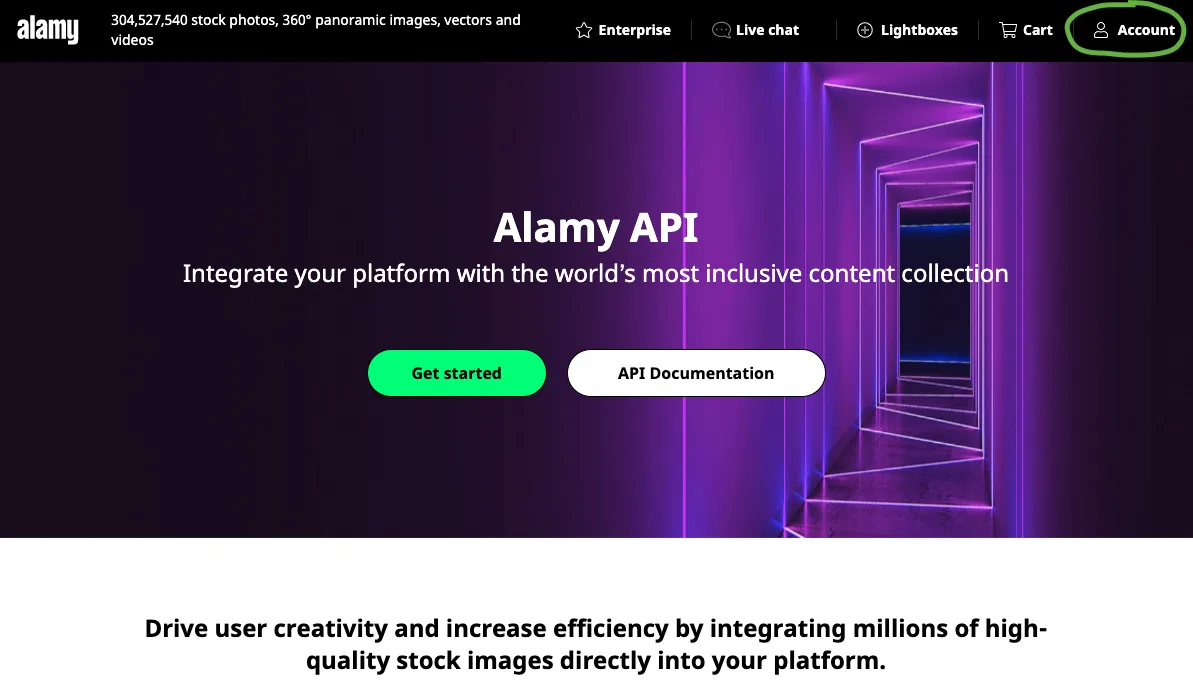
Log into the website using the credentials provided by the account set up process for your API user.
Once logged in you will see the green button on the page change to show your credentials.
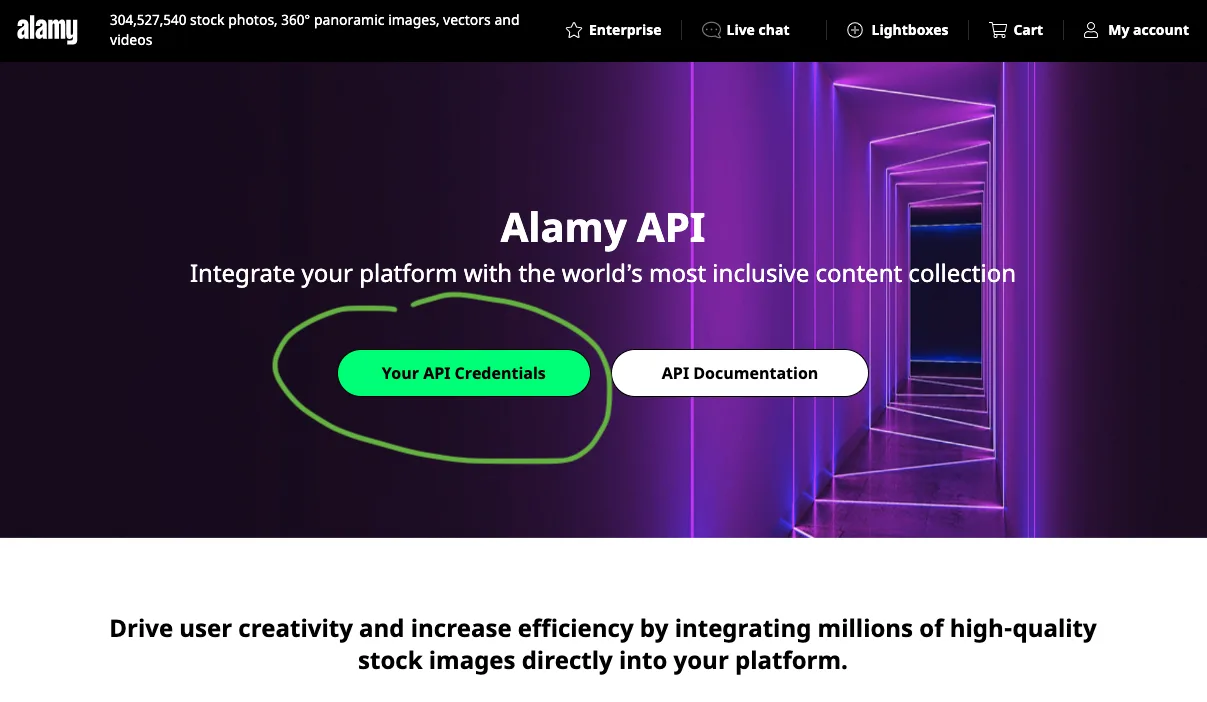
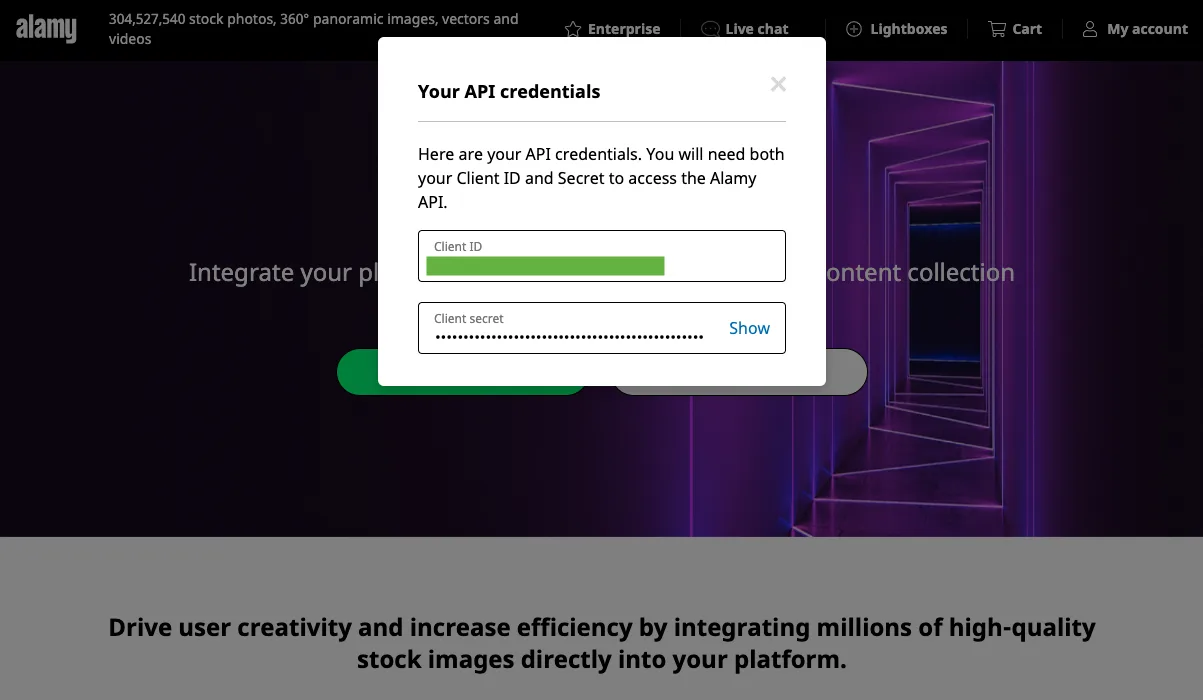
Click that and it will display your API key and secret. These are the credentials you exchange
for an access token at POST /token, using the OAuth 2.0
client credentials grant.
Exchange them for an access token
Send the key and secret to POST /token as HTTP Basic
credentials — the key is the username and the secret is the password, in that order — with
grant_type=client_credentials. Read them from the environment rather than pasting them into a
command, so they stay out of your shell history:
export ALAMY_API_KEY=...     # your API key
export ALAMY_API_SECRET=...  # your API secret

curl -X POST https://api.alamy.com/v3/token \
  -u "$ALAMY_API_KEY:$ALAMY_API_SECRET" \
  -H 'Content-Type: application/x-www-form-urlencoded' \
  -d 'grant_type=client_credentials'
{
  "access_token": "eyJraWQiOi...",
  "expires_in": 86400,
  "token_type": "Bearer"
}
Sending the key and secret as client_id and client_secret form fields works too, if Basic
auth is awkward in your HTTP client.
Scopes
Each endpoint requires a scope. Scopes are full URIs, not short names — search on its own
is rejected with invalid_scope:
| Scope | Grants access to |
|---|---|
https://api.alamy.com/v3/scopes/search | Search |
https://api.alamy.com/v3/scopes/item | Item and bulk items |
https://api.alamy.com/v3/scopes/download | Download |
https://api.alamy.com/v3/scopes/feed | Feed |
https://api.alamy.com/v3/scopes/orders | Order history |
Which scopes your credentials can obtain depends on your subscription.
Any combination is allowed — separate them with spaces. A read-only token for browsing content
would be search plus item; add download only where purchases happen:
curl -X POST https://api.alamy.com/v3/token \
  -u "$ALAMY_API_KEY:$ALAMY_API_SECRET" \
  -H 'Content-Type: application/x-www-form-urlencoded' \
  --data-urlencode 'grant_type=client_credentials' \
  --data-urlencode 'scope=https://api.alamy.com/v3/scopes/search https://api.alamy.com/v3/scopes/item'
Omit scope entirely and the token carries every scope your credentials are granted — the
simplest choice for a general-purpose integration.
Requesting scopes narrows the token to exactly the combination you asked for; it never adds access you were not already granted. That makes it worth using deliberately:
- Mint a
search+itemtoken for the part of your system that browses content, and it cannot spend money even if the token leaks —/downloadwill return401. - Mint a
download-scoped token only in the code path that completes a purchase. - Mint a
feed-only token for the background worker that ingests change notifications.
The trade-off is that a narrowed token returns 401 Unauthorized on any endpoint outside its
scopes, and the body does not say why. If a call fails with 401 on a token you know is current,
decode its scope claim first.
Token lifetime
expires_in is 86400 seconds — 24 hours. The token is a JWT, so you can read its exp claim
instead of tracking expires_in yourself.
Tokens are reused for their lifetime rather than minted per request. A token obtained without
a scope parameter is cached with the scopes you held at the time, so a scope added to your
credentials afterwards will not appear until that token expires — up to 24 hours later. It
surfaces as a 401 from the new endpoint rather than an error when fetching the token.
To pick up a new scope immediately, request one explicitly. Because an explicit request narrows the token, list every scope you need in that one call, not just the new one:
curl -X POST https://api.alamy.com/v3/token \
  -u "$ALAMY_API_KEY:$ALAMY_API_SECRET" \
  -H 'Content-Type: application/x-www-form-urlencoded' \
  --data-urlencode 'grant_type=client_credentials' \
  --data-urlencode 'scope=https://api.alamy.com/v3/scopes/search https://api.alamy.com/v3/scopes/item https://api.alamy.com/v3/scopes/download https://api.alamy.com/v3/scopes/feed https://api.alamy.com/v3/scopes/orders'
Asking for only the newly granted scope would replace a token missing it with one that has nothing else.
Make your first authenticated call
Put the access_token from the previous step in ALAMY_TOKEN and send it as a bearer token.
Search and item metadata calls are free:
curl -H "Authorization: Bearer $ALAMY_TOKEN" \
  'https://api.alamy.com/v3/search?q=dog&limit=1'
The response is a search result set whose items are
IPTC NinJS 2.0 documents. See
Guidance for what the fields mean.
A complete first integration
The whole sequence — token, search, metadata, and where a download would go — in one runnable
script. The token is deliberately minted with only the search and item scopes, so nothing here
touches the download endpoints.
Search and item metadata are free. A download is different: the GET is logged as a download
against your account, and the licensed POST decrements your pack. There is no preview or dry-run
mode for either, so the download step below is left commented out — see
Download and
Testing without spending production budget
for how to exercise it against a pre-production account instead.
curl
Needs jq to read the JSON responses:
#!/usr/bin/env bash
set -euo pipefail

BASE=https://api.alamy.com/v3

# 1. Token. Valid for 24 hours - cache it rather than minting one per request.
TOKEN=$(curl -sS -X POST "$BASE/token" \
  -u "$ALAMY_API_KEY:$ALAMY_API_SECRET" \
  -H 'Content-Type: application/x-www-form-urlencoded' \
  --data-urlencode 'grant_type=client_credentials' \
  --data-urlencode 'scope=https://api.alamy.com/v3/scopes/search https://api.alamy.com/v3/scopes/item' \
  | jq -r .access_token)

# 2. Search. Free. Take the seq id of the first result.
ID=$(curl -sS -H "Authorization: Bearer $TOKEN" \
  "$BASE/search?q=golden+retriever&limit=1" \
  | jq -r '.items[0].altids[] | select(.role == "seq") | .value')

# 3. Complete metadata for that item. Free.
curl -sS -H "Authorization: Bearer $TOKEN" "$BASE/item/$ID" \
  | jq '{uri, by, usageterms}'

# 4. Download. Logged against your account, so it is left commented out - and
#    the token above has no download scope, so it would return 401 anyway.
# curl -sS -H "Authorization: Bearer $DOWNLOAD_TOKEN" "$BASE/download/$ID"
JavaScript
Node 18 or later, no dependencies. Save it as .mjs, or the top-level await will not parse:
const BASE = 'https://api.alamy.com/v3';
const SCOPES = [
  'https://api.alamy.com/v3/scopes/search',
  'https://api.alamy.com/v3/scopes/item',
].join(' ');

// 1. Token. Valid for 24 hours - cache it rather than minting one per request.
const basic = Buffer.from(
  `${process.env.ALAMY_API_KEY}:${process.env.ALAMY_API_SECRET}`,
).toString('base64');

const tokenResponse = await fetch(`${BASE}/token`, {
  method: 'POST',
  headers: {
    Authorization: `Basic ${basic}`,
    'Content-Type': 'application/x-www-form-urlencoded',
  },
  body: new URLSearchParams({ grant_type: 'client_credentials', scope: SCOPES }),
});
// A wrong key or secret fails here, as 400 invalid_client - not later as a 401.
if (!tokenResponse.ok) throw new Error(`token: ${await tokenResponse.text()}`);
const { access_token: token } = await tokenResponse.json();

async function get(path) {
  const response = await fetch(`${BASE}${path}`, {
    headers: { Authorization: `Bearer ${token}` },
  });
  // Branch on the status, not the message text: see the Errors page.
  if (!response.ok) throw new Error(`${response.status}: ${await response.text()}`);
  return response.json();
}

// 2. Search. Free. Take the seq id of the first result.
const results = await get('/search?q=golden+retriever&limit=1');
const id = results.items[0].altids.find((altid) => altid.role === 'seq').value;

// 3. Complete metadata for that item. Free.
const item = await get(`/item/${id}`);
console.log(item.uri, item.by, item.usageterms ?? '(no usage restrictions)');

// 4. Download. Logged against your account, so it is left commented out - and
//    the token above has no download scope, so it would return 401 anyway.
// const { url, expires_in_seconds } = await get(`/download/${id}`);
Python
Uses requests (pip install requests):
import os

import requests

BASE = "https://api.alamy.com/v3"
SCOPES = " ".join(
    [
        "https://api.alamy.com/v3/scopes/search",
        "https://api.alamy.com/v3/scopes/item",
    ]
)

# 1. Token. Valid for 24 hours - cache it rather than minting one per request.
token_response = requests.post(
    f"{BASE}/token",
    auth=(os.environ["ALAMY_API_KEY"], os.environ["ALAMY_API_SECRET"]),
    data={"grant_type": "client_credentials", "scope": SCOPES},
    timeout=30,
)
# A wrong key or secret fails here, as 400 invalid_client - not later as a 401.
token_response.raise_for_status()
token = token_response.json()["access_token"]

session = requests.Session()
session.headers["Authorization"] = f"Bearer {token}"


def get(path):
    response = session.get(f"{BASE}{path}", timeout=30)
    # Branch on the status, not the message text: see the Errors page.
    response.raise_for_status()
    return response.json()


# 2. Search. Free. Take the seq id of the first result.
results = get("/search?q=golden+retriever&limit=1")
item_id = next(a["value"] for a in results["items"][0]["altids"] if a["role"] == "seq")

# 3. Complete metadata for that item. Free.
item = get(f"/item/{item_id}")
print(item["uri"], item["by"], item.get("usageterms", "(no usage restrictions)"))

# 4. Download. Logged against your account, so it is left commented out - and
#    the token above has no download scope, so it would return 401 anyway.
# signed = get(f"/download/{item_id}")
To complete step 4 for real, mint a second token that includes
https://api.alamy.com/v3/scopes/download in the one code path that downloads, and run it against
pre-production credentials while you are still building. The response is a short-lived signed
url plus expires_in_seconds; follow it rather than storing it, and see
Download for what to store instead.
Where to go next
- Guidance — how each endpoint behaves, request limits, and how to read the metadata and rights in responses.
- Errors — every status code the API returns, and which are worth retrying.
- AI coding tools — the machine-readable contract, a read-only setup, and testing a download path safely.
- API Reference — the full endpoint reference, generated from the OpenAPI description.